
Suite Academy - Automate Your Social Media. Grow Smarter.
Unlock the complete roadmap to smarter social growth. Suite Academy gives you clear, actionable tutorials for automating every major platform — helping you save time, increase reach, and scale your online presence with precision and consistency.
The Complete Training Library for Mastering MP Suite
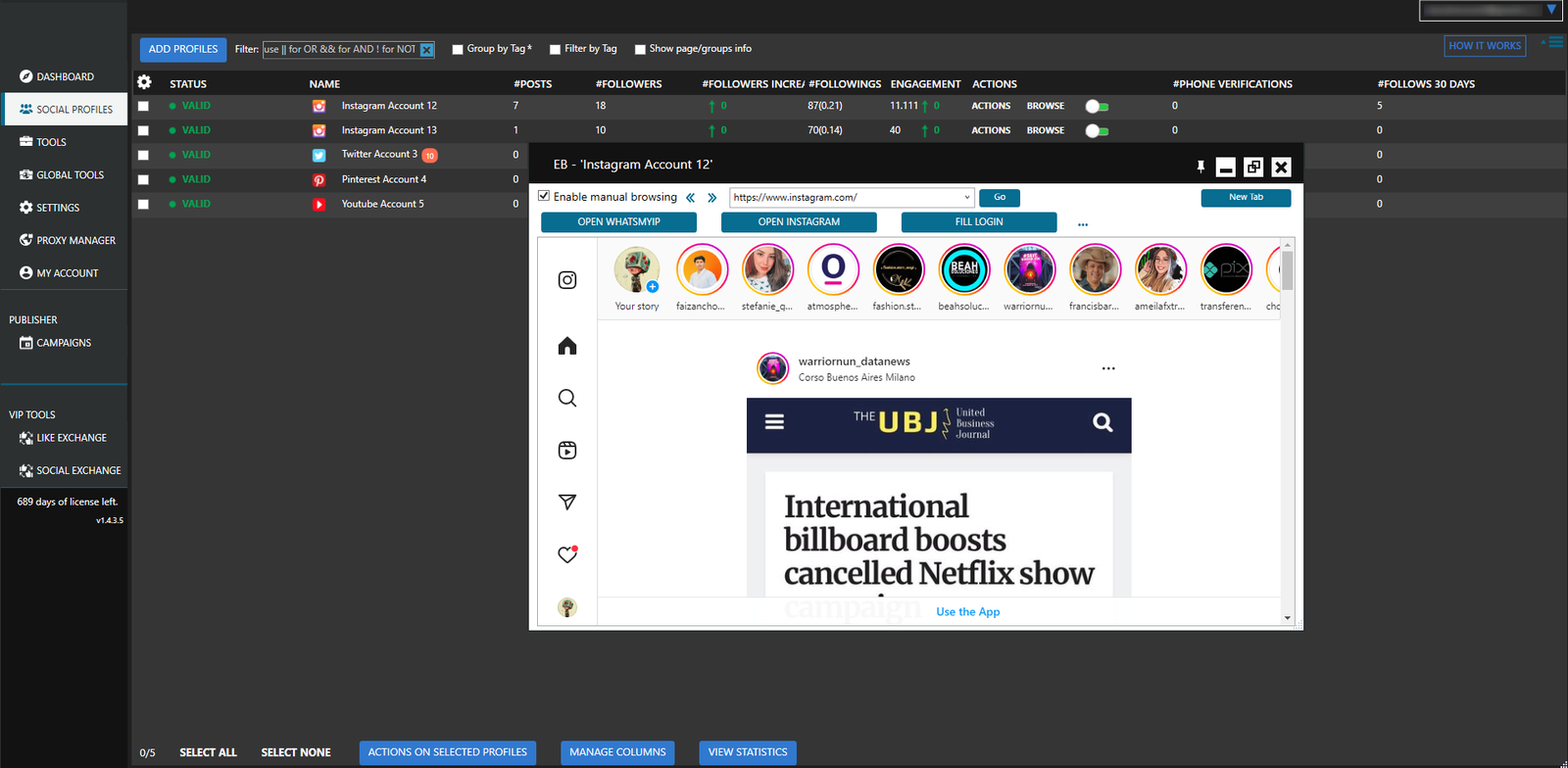
MP Suite Academy is the official step-by-step learning hub designed to help you unlock the full power of MP Suite. Everything is structured, easy to follow, and built for both beginners and advanced automation users.
With MP Suite Academy, you can:
Master the software in hours—not weeks: Learn the entire workflow fast with an intuitive interface, guided presets, and clear automation paths. Even complex multi-account setups become simple thanks to built-in templates and step-by-step onboarding.
Automate every major social platform: Run posting, following, scraping, messaging, warming-up, and engagement tasks across all supported platforms—all in one dashboard. Replace dozens of tools with one unified automation system.
Grow accounts safely at scale: Leverage smart delays, randomized behavior, human-like patterns, and safe-mode actions to reduce risks. Designed for long-term stability so your accounts can grow organically without triggering platform protections.
Operate multi-account systems like a pro: Manage hundreds of profiles, campaigns, and tasks with granular controls. Track performance, organize clients, and run growth machines efficiently from a single, optimized workstation.
Below is the complete breakdown of what’s inside MP Suite Academy:
Getting Started
This module walks you through the entire MP Suite onboarding flow — from installation to first automations. You’ll learn how to connect accounts, run your initial tasks, understand the interface, meet system requirements, and solve early errors so you can start operating immediately without confusion.
- 1How To Download & Install MP Suite
- 2How To Add Your Accounts To MP Suite
- 3How To Automate Posting To Your Accounts
- 4Automating Your Account Growth
- 5Attracting More Attention To Your Account
- 6Automatically Adding Content To Your Accounts
- 7MP Suite Overview
- 8How To Automate Posting To Your Accounts
- 9MP Suite System Requirements
- 10MP Suite Error Codes
- 11MP Suite Get Help
Using Social Profiles
Discover how MP Suite organizes and controls your accounts. You’ll learn to fine-tune profile settings, group accounts by project, manage pages and friends, maintain clean ignore lists, and add internal notes so every profile stays structured and ready for automation.
- 1The Social Profiles Tab
- 2The Account Settings Tab
- 3The Account Groups Tab
- 4The Account Pages Tab
- 5The Account Friends Tab
- 6The Account Ignore Tab
- 7The Account Notes Tab
MP Suite Dashboard
A full breakdown of the main control panel where all performance insights live. You’ll be able to monitor growth metrics, review activity logs, check system updates, manage support communication, and stay informed through real-time notifications.
- 1The Summary Tab
- 2The Statistics Tab
- 3The What’s New Tab
- 4The Contact Support Tab
- 5The Notifications Tab
Instagram Automation Tutorials
Dive deep into the most advanced Instagram automation system. Includes: Follow/Unfollow, Likes, Commenting, Direct Messages, Story Viewer, Saves, Repost, Users & Hashtags Scraper, Mentions, Random Actions, Reels workflows, 2FA handling, and more.
- The Instagram Follow Tool
- The Instagram Follow Back Tool
- The Instagram Unfollow tool
- The Instagram Like Tool
- The Instagram Comment tool
- The Instagram Contact tool
- The Instagram Direct Messages Tool
- The Instagram Manage Comments Tool
- The Instagram Delete Posts Tool
- The Instagram Delete Comments Tool
- The Instagram Block Followers Tool
- The Instagram Repost tool
- The Instagram Users and Hashtags Tool
- The Instagram Like Comments Tool
- The Instagram Save Posts Tool
- The Instagram Story Viewer Tool
- The Instagram Mute Users tool
- The Instagram Random Actions Tool
- The Instagram Mentions tool
- The Instagram Edit Profile Tab
- The Instagram Scrape Tools
- Instagram – Two Factor Authentication
- Instagram – Automatic Email Verification
- Instagram – How To Use Second Level Tagging
- Instagram – Tagname Scraping Method
- How Sending Secondary Messages Work?
- The Instagram Like Exchange Tool
- Using API Limits and Delays for Instagram
- Generating app passwords for Email Verification
- How To Use AI To Comment On Instagram Posts
- How to Fix "Instagram is Always Initializing"
- How the Contextual Actions function works (Instagram)
- How To Import Instagram Accounts Using API Cookies
- Solving Instagram 2FA using a Secret Key
- How To Create Instagram Highlights & Add Stories To Your Highlights
- How to Automatically Solve Captcha?
- Confirming your Instagram account email
- The Full Browser Experience
- The Instagram Reel Viewer Tool
- Unavailable IG tools when Using Only EB
- Using AI Content Comments for MP Suite
Facebook Automation Tutorials
Master Facebook community growth and profile automation. Includes: Group Joiner/Unjoiner, Group Finder, Marketplace Renew, Contact Tool, Post/Comment Deleter, Friends Backup, Invite Tools, Support Inbox, Engagement Exchange, Remove Non-Active Friends, Comment & Like Tool, Unfriender, and more.
- The Facebook Finder Tool
- The Facebook Joiner Tool
- The Facebook Unjoiner Tool
- The Facebook Notifications Off Tool
- The Facebook Account Actions Tool
- The Facebook Accept Members Tool
- The Invite Friends Tool
- How To Use The Facebook Contact Tool In SuSocial
- The Friends Backup Tool
- The Facebook Bump Tool
- The Facebook Delete Posts Tool
- The Facebook Cover Photo Tool
- The Facebook Birthday Tool
- The Facebook Unfriend Tool
- The Facebook Like Comments Tool
- The Facebook Support Inbox Tool
- The Facebook Search and Add Friends Tool
- The Facebook Delete Comments Tools
- The Facebook Accept Group Invites Tool
- The Facebook Marketplace Renew Tool
- The Facebook Reply Comments Tool
- The Social Exchange Tool
- How Sending Secondary Messages Work?
- Actions you can do as a Facebook Page
- Unjoining specific groups on Facebook
- All Facebook Friends Are Not Synced
- The Facebook Remove Non Interactive Friends Tool
- The Facebook Comment & Like Tool
- The Full Browser Experience
- Using AI Content Comments for MP Suite
LinkedIn Automation Tutorials
Automate outreach, networking, and lead generation at scale. Includes: Follow/Unfollow, Profile Viewer, Connector, Search & Connect, Search & Contact, Email Extractor, Company Pages Scraper, Events Tool, Endorse Connections, Cancel Requests, Birthday Tool, Like/Comment tools, and more.
- The LinkedIn Finder Tool
- The LinkedIn Joiner Tool
- The LinkedIn Unjoiner Tool
- The LinkedIn Follow Tool
- The Linkedin Unfollow Tool
- The Linkedin Like Tool
- The Linkedin Comment Tool
- The Linkedin Invite Tool
- The Linkedin Contact Tool
- The Linkedin Birthday Tool
- The Linkedin Unfriend Tool
- The LinkedIn Like Comments Tool
- The Linkedin Endorse Connections Tool
- The Linkedin Accept Connection Requests Tool
- The Linkedin Profile Viewer Tool
- The Linkedin Connector Tool
- The Linkedin Search and Connect Tool
- The Linkedin Search and Contact Tool
- The Linkedin Extract Emails Tool
- The Linkedin Profile Scraper Tool
- The LinkedIn Like As Page Tool
- The LinkedIn Cancel Connection Requests Tool
- The Linkedin Events Tool
- The LinkedIn Two Factor Authentication Tab
- The Social Exchange Tool
- The LinkedIn Share Posts Tool
- The LinkedIn Comment As Page Tool
- The LinkedIn Company Pages Scraper Tool
- The LinkedIn Contact By Tags Tool
- Unjoining specific groups on LinkedIn
- All LinkedIn Friends Are Not Synced
- Linkedin : How To Send Messages To New Connections
- The Full Browser Experience
- Using AI Content Comments for MP Suite
Twitter Automation Tutorials
Run growth, engagement, and messaging automations safely.
Includes: Follow/Unfollow, Likes, Retweets, Replies, Mention Tool, Delete Posts, Contact Tool, Advanced Search Operators, Full Browser Experience, and more.
- The Twitter Follow Tool
- The Twitter Follow Back Tool
- The Twitter Unfollow Tool
- The Twitter Like Tool
- The Twitter Retweet And Reply Tool
- The Twitter Mention Tool
- The Twitter Delete Posts Tool
- The Twitter Email Validation Tab
- Twitter Advanced Search Operators
- The Social Exchange Tool
- How Sending Secondary Messages Work?
- The Full Browser Experience
- The Twitter Contact Tool
- Using AI Content Comments for MP Suite
Pinterest Automation Tutorials
Automate content distribution and audience building.
Includes: Follow/Unfollow, Repin Tool, Comment Tool, Contact Tool, Board Creation, Social Exchange, Full Browser Experience, and more.
- The Pinterest Follow Tool
- The Pinterest Follow Back Tool
- The Pinterest Unfollow Tool
- The Pinterest Comment Tool
- The Pinterest Repin Tool
- The Pinterest Contact Tool
- The Pinterest Create Boards Tool
- The Social Exchange Tool
- The Full Browser Experience
- Using AI Content Comments for MP Suite
Quora Automation Tutorials
Grow a knowledge-based profile automatically. Includes: Follow/Unfollow, Upvote Tool, Answer Automation, Social Exchange, Full Browser Experience, and more.
- The Quora Follow Tool
- The Quora Unfollow Tool
- The Quora Upvote Tool
- The Quora Answers Tool
- The Social Exchange Tool
- The Full Browser Experience
- Using AI Content Comments for MP Suite
Reddit Automation Tutorials
Boost visibility and automate engagement on Reddit. Includes: Comment automation, Post Upvotes, Comment Upvotes, Full Browser Experience, and more.
- The Reddit Comment Tool
- The Reddit Upvote Tool
- The Reddit Upvote Comments Tool
- The Full Browser Experience
- Using AI Content Comments for MP Suite
Youtube Automation Tutorials
Includes: Subscribe/Unsubscribe, Like Tool, Comment Tool, Like & Reply Comments, Watch Videos, Repost Tool, Reels/Shorts fixes, login troubleshooting, and more.
- The Youtube Follow Tool
- The Youtube Unfollow Tool
- The Youtube Like Tool
- The Youtube Comment Tool
- The Youtube Like and Reply Comments Tool
- The Youtube Watch Videos Tool
- The Social Exchange Tool
- How to fix "Couldn't sign you in" for YouTube
- The Youtube Repost tool
- The Full Browser Experience
- Using AI Content Comments for MP Suite
Tumblr Automation Tutorials
Automate blogging-style interactions. Includes: Follow/Unfollow, Like Tool, Reblog Tool, Contact Tool, Social Exchange, Full Browser Experience.
- The Tumblr Follow tool
- The Tumblr Unfollow tool
- The Tumblr Like tool
- The Tumblr Reblog tool
- The Tumblr Contact tool
- The Social Exchange Tool
- The Full Browser Experience
Settings
Explore the configuration options that power your system: browser settings, platform tweaks, connection behavior, backup rules, action limits, notification controls, and security parameters. Proper setup ensures safer, smoother automation.
- The Software Settings tab
- The Embedded Browser Tab
- The Social Platforms tab
- The Connectivity Tab
- The Error and BackUp Tab
- The Email Notification Tab
- The Actions tab
- Settings – Social Platforms – Instagram
Global Tools
A complete set of mass-action utilities designed for high-volume operators. Send global messages, scrape at scale, manage comments in bulk, run engagement groups, create accounts automatically, edit profiles in batches, and control embedded browsers across all accounts.
- Global Tools – The Instagram Story Viewer Tool
- The Global Tools - The Instagram Direct Messages Tool
- The Global Tools – The Instagram Create Accounts Tool
- The Global Tools – The Instagram Manage Comments Tool
- The Global Tools – The Instagram Engagement Groups Tool
- The Global Tools - The Instagram Scrape History Tool
- The Global Tools - The Instagram Words List Tool
- The Global Tools - The Twitter Bulk Profile Editor Tool
- The Global Tools - The Twitter Create Accounts Tool
- The Global Tools - The Embedded Browsers
Using Campaigns
You’ll master MP Suite’s posting engine — one of the most flexible in the automation industry. Learn how to
build smart campaigns, automate publishing across accounts, schedule content, use AI-generated posts, scrape or import content.
Extra Resources
Advanced materials for users who want to maximize MP Suite’s capabilities. You’ll learn how to migrate the software to another server, handle licensing, manage billing, import cookies, use CSV workflows, optimize scrapers, bypass captchas, verify emails.
- How To Use The Proxy Manager
- The Tools View Tab
- Creating Posts Using AI Content Generator
- How To Access Your VPS From An Android Device
- How To Move MP Suite to another Computer/VPS
- MP Suite License Limit Reached
- How Can I Upgrade To The Next Higher Plan?
- Do You Have Any Other Higher Plans?
- Local Data Is Locked For ’email’ Error
- How to publish a post to your blogs via MP Suite
- One year free Windows VPS for MP Suite – Full Guide
- How To Access Your VPS From An iOS Device
- How Can I Change My Password?
- The Computer That You Are Using Is Blacklisted
- I Want To Change My MP Suite Account Email
- Multilogin Tool
- Generating app passwords for Email Verification
- Actions you can do as a Facebook Page
- How the Contextual Actions function works (Instagram)
- How to send emails using MP Suite
- How To Enable External App Password For Mail.ru (BK.ru, index.ru, List.ru)
- Creating Clickable Image Posts in MP Suite
- Yahoo 2-Step Verification
- Rediffmail 2-Factor Authentication
- Google 2-Step Verification
- How To Import Instagram Accounts Using API Cookies
- All Facebook Friends Are Not Synced
- All LinkedIn Friends Are Not Synced
- Mail.ru 2-Factor Authentication
- How To Generate API Keys for the Connectivity tab
- How To Post To Stories Via MP Suite
- How To Create A Spin Syntax Text
- Keep Your Scrapers Running Forever: A Beginner's Guide
- Publishing Instagram Reels with MP Suite: A Step-by-Step Guide
- Importing Cookies to MP Suite
- How To Add Posts In Bulk Using A CSV File To Your Campaign In MP Suite
- How To Add and Publish Sell Posts To Facebook Marketplace & Sell Groups
- How to profile my accounts?
- Troubleshooting issues using the Summary tab
- How To Use COPY SETTINGS and GLOBAL COPY SETTINGS In MP Suite Tools
- How to Automatically Solve Captcha?
- Confirming your Instagram account email
- How to Publish A Video To Facebook Reels Using MP Suite
- Unavailable IG tools when Using Only EB
- Using AI Content Comments for MP Suite
$7
(one-time payment)
What's Included:
It helps you:
We accept payments via Crypto, PayPal, Credit Card, and Visa.

Message us at @followforfollowbot with your transaction ID or payment email for instant activation.
Fastest support via Telegram - replies within minutes!
Refund Policy
No refunds are offered for MP Suite Academy. It’s a low-cost educational product designed to help you learn first, decide later.
MP Suite Academy is a step-by-step training program that teaches you how social automation works, how campaigns are structured, and how to evaluate results — before deciding whether MP Suite is right for you.
No. The Academy is designed so you can learn everything without installing or buying the tool.
No. It’s not a demo.
It’s a practical training course that shows you the strategy, logic, and workflow behind automation, so you understand exactly what the software will do for you.
Yes — that’s the main purpose.
By the end of the Academy, you’ll know whether automation is a good fit for your goals and whether MP Suite is the right solution.
No.
This is a low-cost, one-time payment with lifetime access.
Think of it as the safest and cheapest way to test whether automation is right for you.
You’ll get training on:
Automation fundamentals
Multi-platform workflows: Instagram, Facebook, X, Pinterest, LinkedIn, YouTube, Quora, Tumblr, Reddit
Proxy usage, warm-up systems, anti-block methods
Real case studies and sample setups
Growth strategy and campaign optimization
After payment, you’ll receive access to a private learning area containing tutorials, videos, roadmaps, and step-by-step checklists.
No. Everything is explained clearly from beginner to advanced.
Absolutely.
Once you finish the Academy and feel confident in automation, you can subscribe to MP Suite anytime.